 MAD
MAD
 MAD Designer for macOS

MAD Designer for macOS is a native AppKit desktop application (macosx SDK, MACOSX_DEPLOYMENT_TARGET = 12.0) for creating, querying, laying out, refreshing, printing, and exporting Mobile Analytics Documents (.mad). It links the same first-party Objective-C frameworks and universal static C libraries (Compressor) that power the iOS apps and the headless engine.
Every .mad file created or edited on macOS is byte-compatible with the iPad/iPhone apps, the mad CLI on Linux, and the mad-action GitHub Action.
Download & Install
- Homebrew (macOS 12.0+, Apple Silicon):
brew install --cask mthomason/tap/mad-designer - Direct Download: MAD-Designer-macOS.dmg | MAD-Designer-macOS.zip
(If you download the
.dmgor.zipin a browser, runxattr -cr "/Applications/MAD Designer.app"once after copying to/Applicationsto clear the macOS Gatekeeper quarantine flag.)
Workspaces
Each open .mad document runs in a native NSDocument window (MADMacDocument / MADMacWindowController) with a centered Workspace segmented control in the window toolbar (Cmd+1, Cmd+2, Cmd+3) that switches between the three reporting stages:
1. MAD Query (Cmd+1)
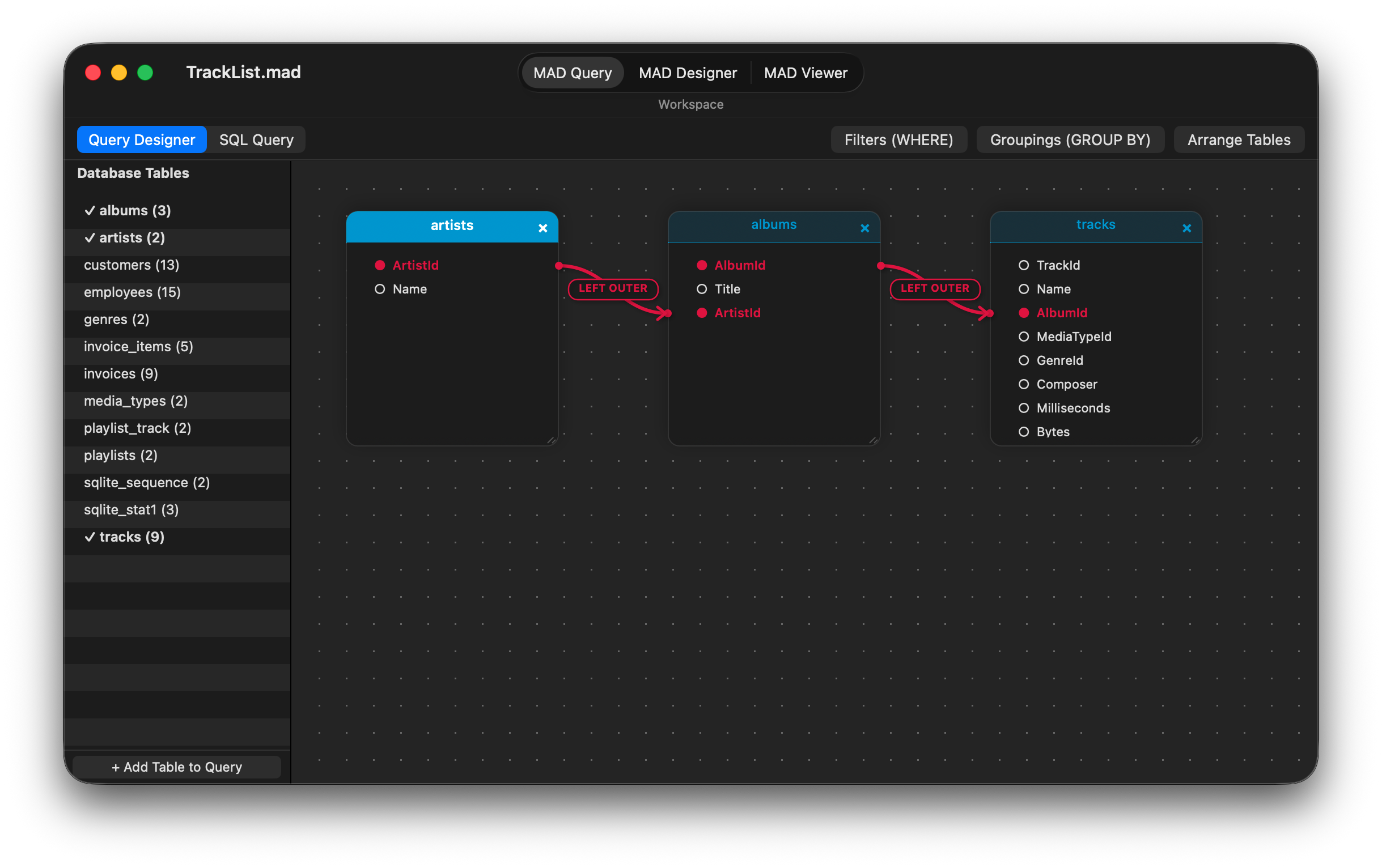
The MAD Query workspace (MADMacQueryViewController) builds the relational query graph stored in RptqQuery. A toggle in the workspace bar switches between two mutually exclusive views of the query:
- Query Designer (Visual Graph):
- Database Tables Sidebar: Displays every table imported into the document’s schema snapshot (
RptqDatabaseSchemaTable) with column counts and checkmarks for tables currently participating in the query. Double-click any table (or click + Add Table to Query) to add it to the canvas. - Interactive Relationship Canvas (
MADMacQueryCanvasView): Renders each query table as a draggable, resizable card (MADMacQueryTableCardView) over a dot-grid canvas, styled with topological root/child header colors computed byMTGraph. - Visual Join Connectors (
MADMacQueryLinksOverlayView): Dragging from a column in one table card to a column in another creates a join (defaulting toLEFT OUTER), drawn with smooth cubic Bezier curves, directional arrowheads, and pill badges. Clicking or right-clicking a join badge opens a join inspector popover or context menu to change the join type (INNER,LEFT OUTER,RIGHT OUTER,FULL OUTER,CROSS), reverse the join direction, or delete the link. - Filters, Groupings & Auto-Layout: Header bar popovers edit
WHEREpredicates (Filters (WHERE)),GROUP BY/ sort order (Groupings (GROUP BY)— which automatically provisions matchingGroup HeaderandGroup Footerlayout bands), and Arrange Tables for automatic topological card placement.
- Database Tables Sidebar: Displays every table imported into the document’s schema snapshot (
- SQL Query (Direct SQL Entry & Inspection):
- Displays the deterministic dialect-specific SQL generated from the visual graph and allows pasting or editing a
SELECTstatement directly. - Validates and compiles entered SQL back into the portable
RptqQueryobject graph viaMADSQLParser,MADSQLStatementResolver, andMADSQLQueryCompiler, preserving the statement inRptqQuery.sqlSourceText.
- Displays the deterministic dialect-specific SQL generated from the visual graph and allows pasting or editing a
2. MAD Designer (Cmd+2)
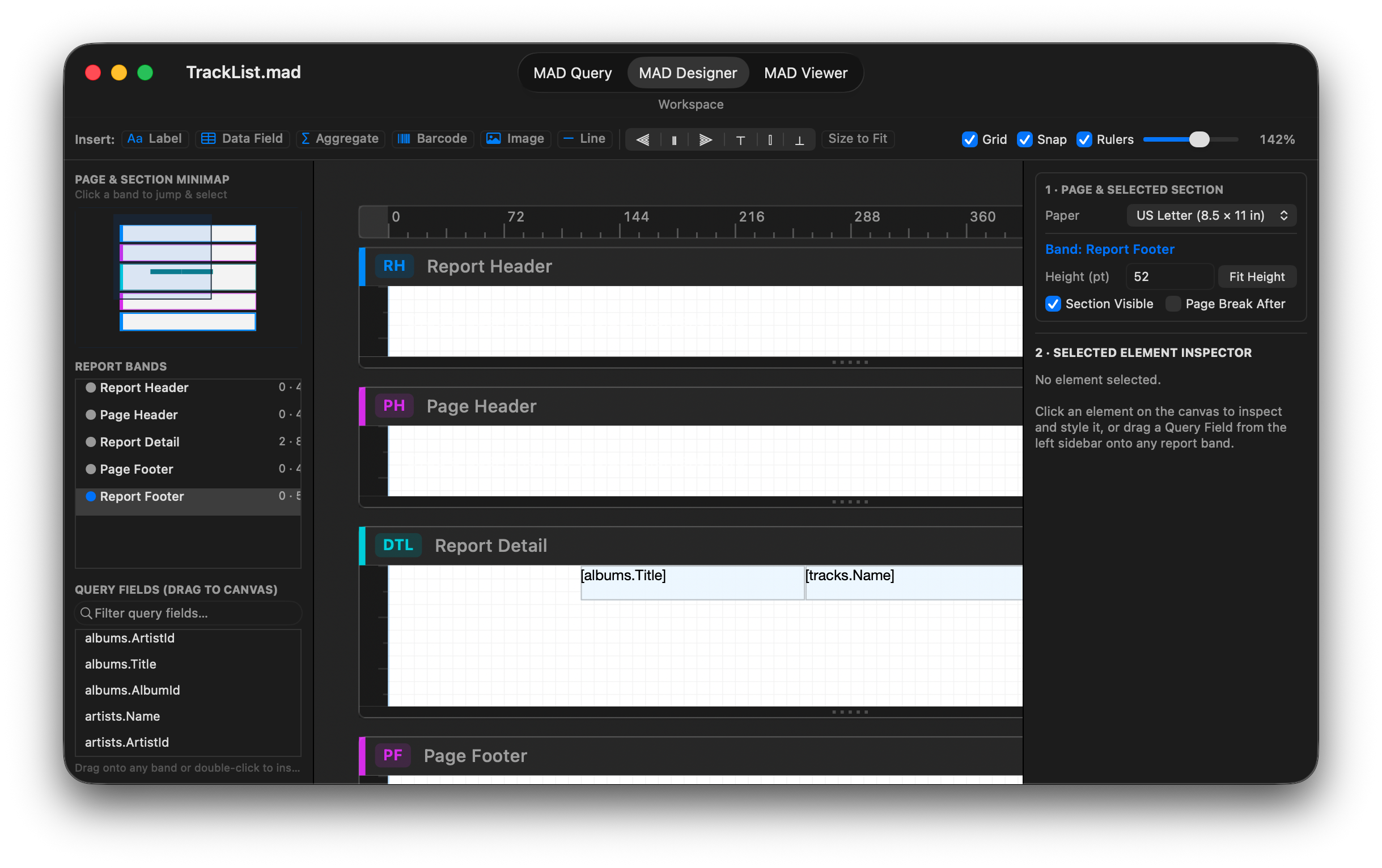
The MAD Designer workspace (MADMacDesignerViewController) lays out the report’s parametric bands and elements inside a user-resizable three-pane split view:
- Top Designer Toolbar:
- Element Palette: Click or drag onto any section band to insert a Label, Data Field, Aggregate, Barcode, Image, or Line.
- Alignment & Sizing: Multi-element alignment buttons (
Align Left,Center,Right,Top,Middle,Bottom) and Size to Fit. - Canvas Controls: Independent toggles for Grid, Snap, and Rulers, plus a continuous Zoom slider (
50%–250%) with one-click100%reset.
- Left Navigator Sidebar:
- Page & Section Minimap (
MADMacDesignerMinimapView): Live proportional bird’s-eye view of all report bands, miniature element blocks, and the active scroll viewport rectangle. Click or drag inside the minimap to jump to and select any band. - Report Bands Outline: Lists
Report Header,Page Header, anyGroup Header/Group Footerbands,Report Detail,Page Footer, andReport Footerwith element counts, point heights, and page-break indicators. Double-clicking a row toggles section visibility. - Query Fields Browser: Filterable list of all
RptqQueryFieldcolumns from the query. Drag any field directly onto a section band on the canvas (or double-click) to create a bound data-field element (RptqDocumentElementLabelDataField).
- Page & Section Minimap (
- Center Interactive Canvas (
MADMacDesignerCanvasView):- Flipped, zoomable
NSViewcanvas with horizontal and vertical point rulers, paper margin guides, color-coded section headers (RH,PH,GH,DTL,GF,PF,RF), and bottom drag handles for resizing section heights. - Supports marquee selection,
Shift-click multi-selection, 8-point resize handles, smart alignment guides, grid snapping, inline double-click text editing, cross-section drag-and-drop (-moveElement:toSection:atOrigin:), and fullNSUndoManager(Cmd+Z/Cmd+Shift+Z) undo/redo across single and bulk property edits.
- Flipped, zoomable
- Right Inspector Sidebar:
1 · PAGE & SELECTED SECTION: Configures the target Paper size, displays the active band badge, edits section Height (pt) with a Fit Height button, and toggles Section Visible and Page Break After.2 · SELECTED ELEMENT INSPECTOR: Four contextual cards when an element is selected:- Element & Band Assignment: Reassigns the element to another section band, duplicates (
Cmd+D), or deletes (Delete). - Content & Data Binding: Static text, bound query column (
table.column), aggregate function (SUM,COUNT,AVG,MIN,MAX,STDDEV,VARIANCE) and scope (ReportorGroup), currency formatting, or barcode symbology (zint). - Typography & Appearance: Font family, point size, Bold / Italic / Underline / Strikethrough traits, horizontal and vertical text alignment, foreground color, and background fill.
- Position, Size & Box Model: Exact point coordinates (
X,Y,W,H), border width/color, padding, and margins.
- Element & Band Assignment: Reassigns the element to another section band, duplicates (
3. MAD Viewer (Cmd+3)
The MAD Viewer workspace (MADMacViewerViewController) refreshes the query against its live data source, materializes the result set into the local SQLite table cache (MADDataTableFast), and renders paginated pages:
- Viewer Toolbar:
- Page Size Selector (
MTPaper): Immediately re-paginates and re-renders the report for US Letter, US Legal, US Tabloid, A3, A4, A5, B4, B5, JIS B4, or JIS B5. - Refresh (
Cmd+R): Executes the query through the document’s registered database driver, populates the.maddb/.mdcachecompanion SQLite cache, computes two-pass groupings and aggregates, and rebuilds the page cache. - Zoom & Page Navigation: Zoom out, reset to
100%, zoom in, and step through pages (Previous,Page N of M,Next). - Print (
Cmd+P) & Export (Cmd+E): Prints natively throughNSPrintOperationor opensNSSavePanelwith a format picker for all seven registered exporters:- PDF Document (
.pdf) — native CoreGraphics / AppKit vector PDF viaMADReportExporterPDF - HTML Page (
.html) — positioned page facsimile (MADReportExporterHTML) - HTML Flow (
.html) — responsive reflowable semantic HTML (MADReportExporterHTMLFlow) - CSV Spreadsheet (
.csv) — RFC 4180 detail row export (MADReportExporterCSV) - JSON Data (
.json) — schema contract + detail rows (MADReportExporterJSON) - JSON Full Report (
.json) — hierarchical sections, groups, and evaluated elements (MADReportExporterJSONReport) - Plain Text (
.txt) — monospace text table (MADReportExporterText)
- PDF Document (
- Page Size Selector (
- Framed Page Preview & Status Bar: Renders crisp, drop-shadowed pages inside a native
PDFViewand reports the rendered page count, cached row count, and paper dimensions in the bottom status bar.
Opening & Creating Documents
- Launch & Open Panel (
MADMacDocumentController): Launching the app without a file presents the macOS Open Report panel filtered to.maddocuments (com.everydayapps.productivity.madandcom.thomason.report.mad) with a primary New Document button in the bottom-left bar. Double-clicking any.madfile in Finder opens it directly into its workspace window. - Legacy Document Migration: Opening an older Core Data
.madarchive automatically converts its store in place to the portable SQLite schema (MADStoreSchema) viaMADStoreConverter. - New Report from Database Connection (
Cmd+N): Clicking New Document (or choosing File → New Document…) opens the database connection assistant (MADMacConnectionWindowController):- Choose SQLite, MySQL, Microsoft SQL Server, or PostgreSQL.
- Browse for a local
.sqlite3/.dbdatabase or enter server host, port, optional SQL Server instance, database name, username, and password. - Click Test Connection to verify connectivity and inspect the discovered table count.
- Click Create Document… to import the database’s table and column schema into a new
.madfile and open it in the MAD Query workspace. Credentials are stored in the macOS Keychain viaMADKeyChain.
Architecture: Native AppKit over Multiplatform Frameworks
Rather than wrapping the iOS UI in Mac Catalyst, MAD compiles twelve of its fourteen frameworks natively for macosx (SUPPORTED_PLATFORMS = "iphoneos iphonesimulator macosx", MACOSX_DEPLOYMENT_TARGET = 12.0) and puts a purpose-built AppKit document architecture (Mac/Source/) on top:
| Layer | Components | Role on macOS |
|---|---|---|
Static C Libraries (Compressor) |
sqlite3, zlib, openssl, bzip2, libpng, libarchive, freetds, mariadb, postgres, zint |
Universal (arm64 + x86_64) macosx slices inside .xcframework bundles, verified by ./Compressor/build.sh --verify --all --platforms ios,simulator,macosx. |
| Core & Driver Frameworks | MADFoundation, MADDataStructures, MADCocoaExtensions, MADFileManager, MADAPI, MADSqlite3, MADTds, MADTdsClient, MADMySQL, MADPostgres, MADBarcodes, MAD |
Shared Objective-C model, portable SQLite store (Rptq*), SQL parser/compiler, wire database drivers, zint barcode renderer, MADDesignerLayout undo/redo engine, and MADPrintPageRenderer / MADReportExporterPDF. |
Native AppKit Frontend (Mac/) |
MADMacAppDelegate, MADMacAboutWindowController, MADMacDocumentController, MADMacDocument, MADMacWindowController, MADMacConnectionWindowController, MADMacQueryViewController, MADMacDesignerViewController, MADMacDesignerCanvasView, MADMacViewerViewController |
Native NSDocument lifecycle, About / Overview / Acknowledgements window, toolbar & menu bar, visual query canvas, 3-pane report designer with minimap & inspector, and PDFView report viewer. |
The full architectural audit and defect log from the multiplatform port are recorded in docs/project/MAD_MACOS.md.
Building, Testing, and Packaging
In Xcode
Open Reports.xcworkspace, select the MAD Designer Mac shared scheme with destination My Mac, and press Run (Cmd+R) to build and debug the native macOS app interactively.
To run any framework’s unit test suite natively on macOS:
xcodebuild test -workspace Reports.xcworkspace -scheme MAD \
	-destination 'platform=macOS,arch=arm64' \
	-derivedDataPath ~/Library/Developer/Xcode/DerivedData/Reports-cozeiyczmvgrbeapplwfuygymqci
Command-Line Build, Smoke Suite & Release Packaging
The standalone script Mac/build.sh compiles all twelve macOS frameworks, assembles and signs Mac/build/MAD Designer.app, runs the end-to-end headless + AppKit smoke test suite (Mac/Tests/MADMacSmokeTest.m), and packages distributable .zip and .dmg archives:
./Mac/build.sh                     # build 12 macOS frameworks + MAD Designer.app
./Mac/build.sh --no-frameworks     # rebuild only MAD Designer.app (fast iteration)
./Mac/build.sh --smoke-test        # build and run the end-to-end macOS smoke suite
./Mac/build.sh --package           # package MAD-Designer-macOS.zip and MAD-Designer-macOS.dmg